
NixOS on Oracle Cloud's Free ARM Server
How I replaced Ubuntu with NixOS on Oracle Cloud's free Ampere server, then ran a Nuxt and Bun site on it without the need of Docker
I have been deploying my side projects with Dokploy. It's a nice open-source Vercel-like dashboard built on top of docker that you can install on any machine. Write a Dockerfile, push, done. It works but the abstraction makes it hard to learn what's going on underneath.
So I got a free ARM instance on Oracle Cloud Infrastructure (OCI) and set myself a goal:
Learn NixOS by running real things on it, without Docker. This post covers everything it took:
- Replacing the Ubuntu image with NixOS, using nixos-anywhere
- A small flake config deployed from my laptop with one command
- Caddy with automatic HTTPS (Can be replaced with Nginx or Traefik)
- Publishing the config while keeping my app private
- Deploying a Nuxt 4 and Bun site as a sandboxed systemd service, with a deploy on every git push
I'll include the mistakes too. There were plenty.
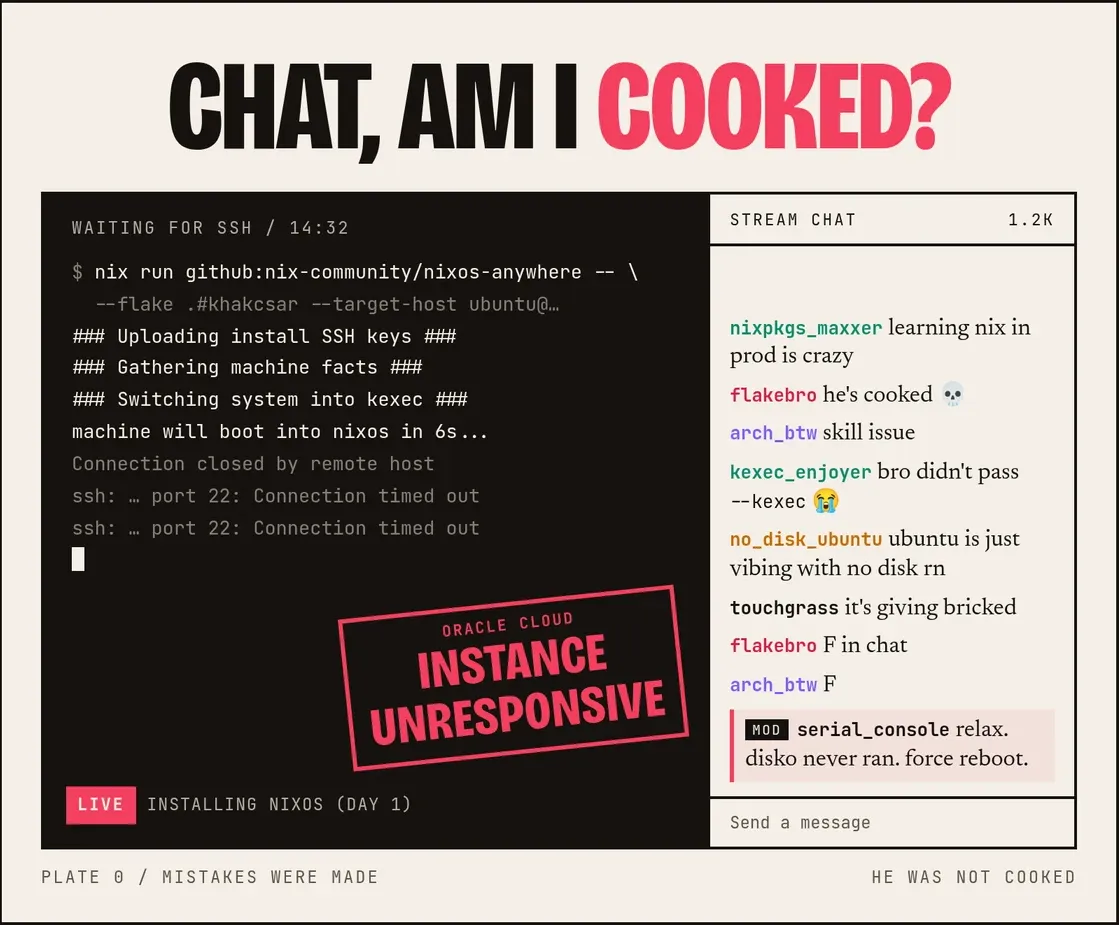 Me after kexec left Ubuntu with no disk and no network
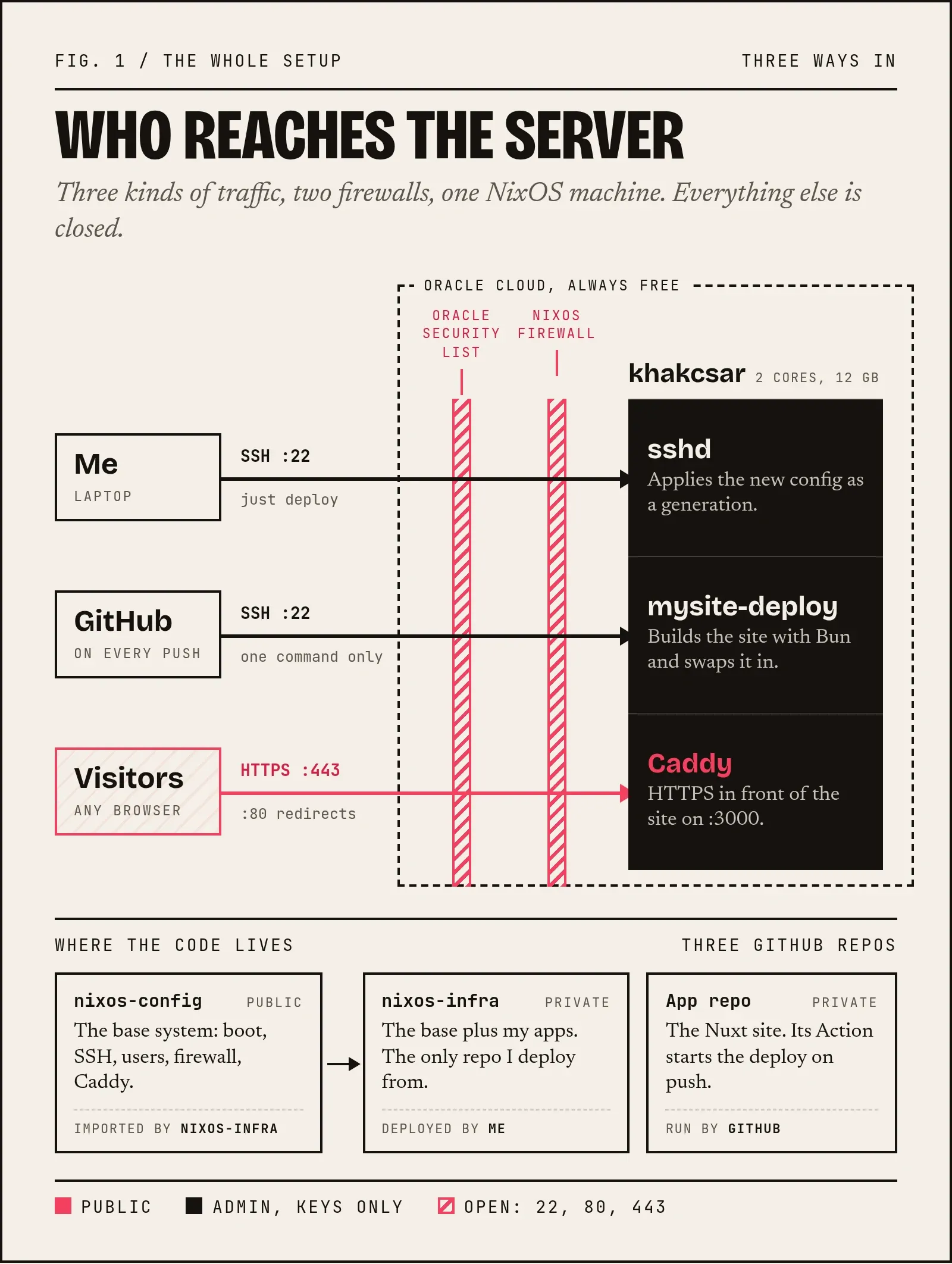
You can check my config repo here. Here is the setup we are heading to. Keep this picture in mind.
The machine
| Shape | VM.Standard.A1.Flex (Ampere ARM), 2 OCPU / 12 GB |
| CPU | Neoverse-N1, aarch64-linux |
| Disk | 46.6 GB boot volume, paravirtualized (virtio-scsi) |
| Firmware | UEFI, Secure Boot off |
| Region | Frankfurt |
The free tier is smaller than most guides say
If you look at older tutorials, they say that you get 4 OCPU / 24 GB of ARM. Oracle's Always Free page now says:
All tenancies get the first 1,500 OCPU hours and 9,000 GB hours per month for free ... For Always Free tenancies, this is equivalent to 2 OCPUs and 12 GB of memory.
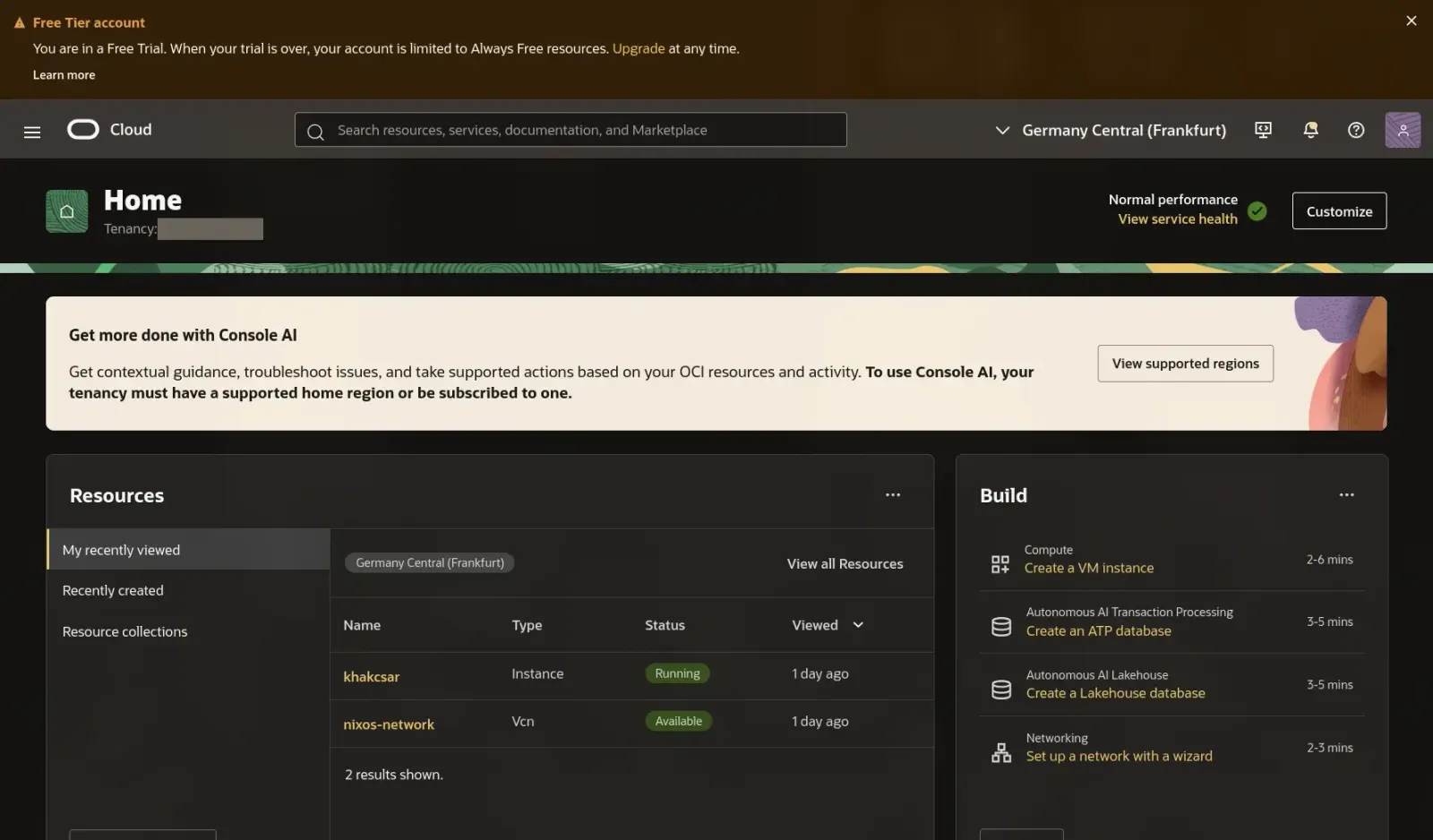
My account was still on it Free Trial so Oracle happily let me creaate a 4/24 instance. That's double the free allowance and the page above doesn't even say what happens to oversized instances when the trial ends. I resized it to 2/12 (Instance → Edit → Shape, one reboot, no reinstall) before doing anything else.
Two more rules from the same page are worth sharing:
- The Always Free instances must be in your home region.
- Idle instances are reclaimed: an instance is taken back if the CPU (95th percentile), network and memory all stay below 20% over 7 days.
Part 1: Preparation
Before doing anything destructive, we need to perform some checkups.
Make sure that the serial console works
If SSH or networking ever breaks, the serial console is the only way in. Test it BEFORE you need it:
Instance → OS Management → Console connection → Launch Cloud Shell connection, then press Enter a few times. You should get a login: prompt.
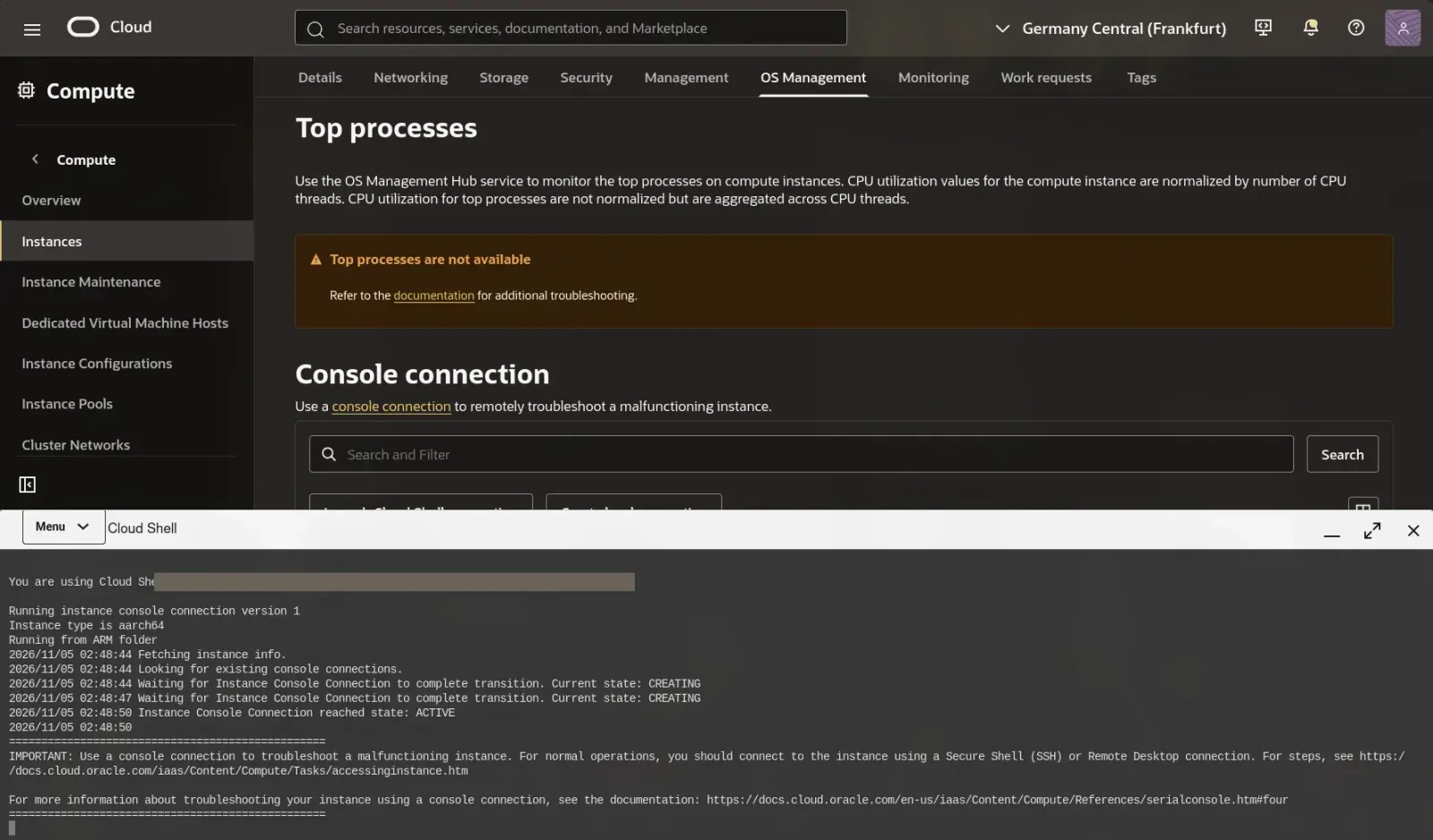
Ubuntu's default user has no password so you can't actually log in there. That's why my NixOS config gives the admin user a password only for the serial console. SSH stays key-only.
Back up the boot volume
Storage → Boot volume → Backups → Create (Full). It doesn't use the VM's disk and the Always Free tier includes 5 volume backups. This is actually pretty cool because if things go badly, you can just restore in onto the same instance.
Open ports 80 and 443 in Oracle's firewall
Oracle Cloud Infrastructure (OCI) has a cloud firewall in front of the VM. A port has to be open there AND in the OS firewall.
The VCN wizard in the OCI dashboard creates two subnets: public (10.0.0.0/24) and private (10.0.1.0/24). The instance lives in the public one.
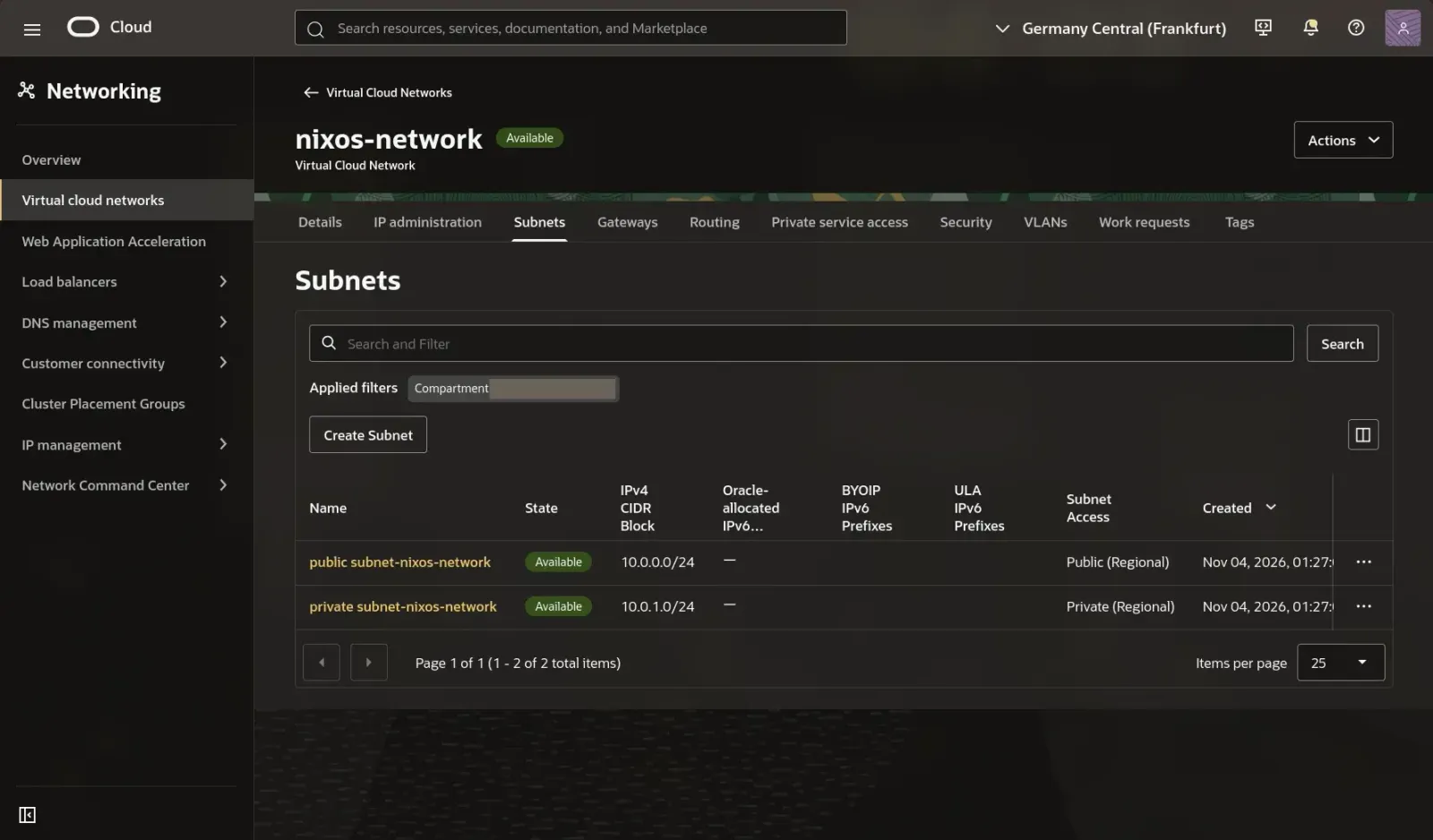
Networking → VCN → public subnet → Security → Default Security List → Add Ingress Rules:
| Field | Value |
|---|---|
| Stateless | off |
| Source CIDR | 0.0.0.0/0 |
| IP Protocol | TCP |
| Source Port Range | empty |
| Destination Port Range | 80,443 |
Make sure NOT to put 80 and 443 in Source Port Range. The source port is the visitor's random port so the rule never matches. Oracle splits 80,443 into two rows when it saves:
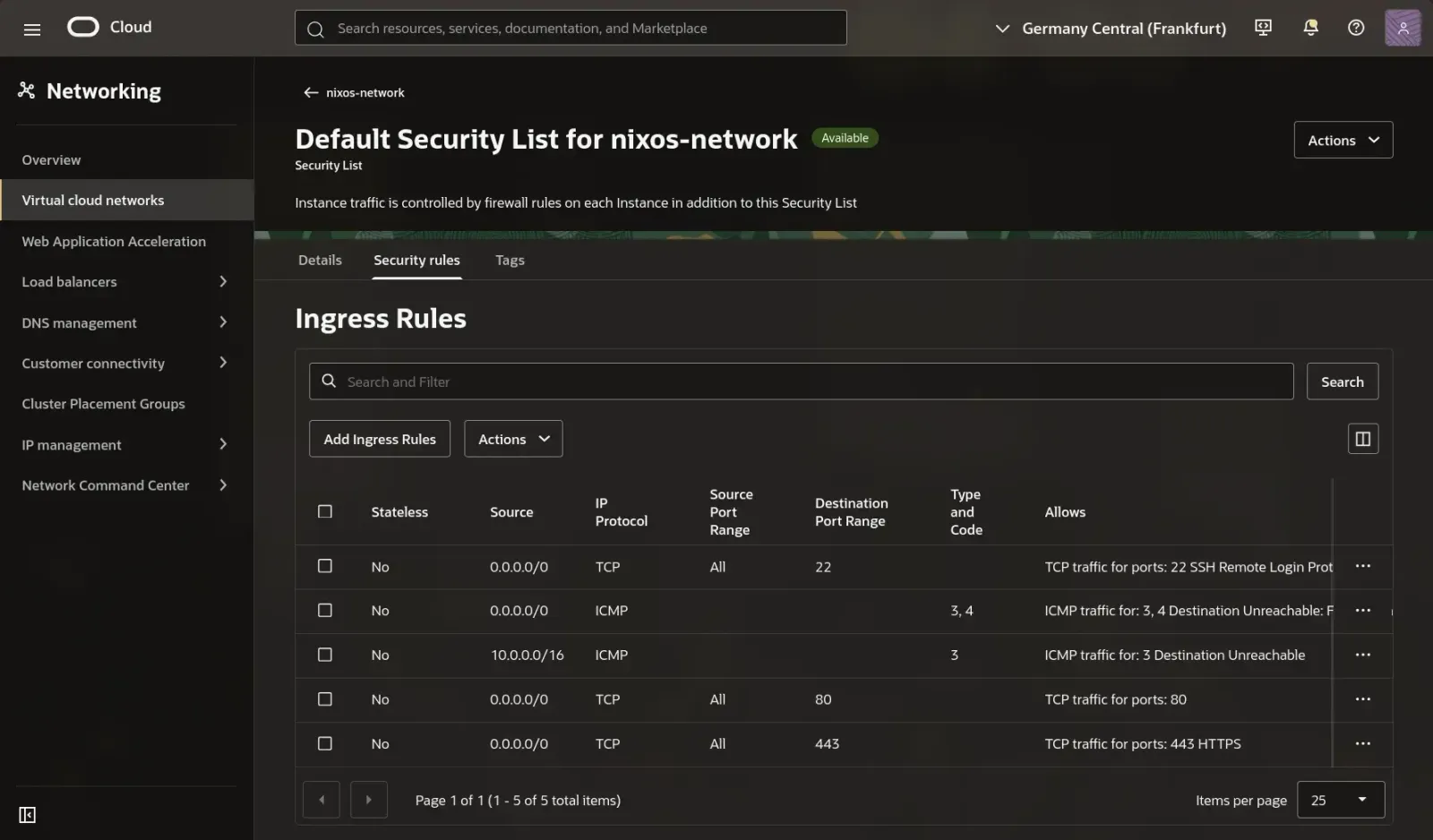
There's also no rule for ICMP type 8, so for example ping command won't work. That's normal.
Install Nix on the laptop
My laptop runs Arch (btw) and it stays Arch. It only needs Nix, the package manager. Nix lives in /nix and never touches the rest of my laptop's system. Here is how I installed it:
sudo pacman -S --needed nix
sudo systemctl enable --now nix-daemon.service
mkdir -p ~/.config/nix
echo "experimental-features = nix-command flakes" >> ~/.config/nix/nix.conf
Two Arch surprises (Nix 2.35):
- There is no
nix-usersgroup (usermod: group 'nix-users' does not exist). In older guides and tutorials, they tell you to join it but you don't need to. The daemon socket is world-accessible andallowed-usersdefaults to*. /nix/storedidn't exist, so the first command failed witherror: opening file "/nix/store": No such file or directory. The fix:
sudo mkdir -p /nix/store
sudo chown root:nixbld /nix/store
sudo chmod 1775 /nix/store        # sticky bit + group-writable for the build users
sudo systemctl restart nix-daemon
nix run nixpkgs#hello              # Hello, world!
Part 2: The config
The final layout:
nixos-config/
├── flake.nix
├── flake.lock
├── hosts/
│   └── khakcsar/
│       ├── default.nix                 # the system
│       ├── disko.nix                   # the disk layout
│       └── hardware-configuration.nix  # generated during install
└── services/
    └── caddy.nix
A heads-up before you copy this: I'm new to Nix, and I don't think this is the best way to structure a NixOS config. It's simply the layout that made sense to me while learning. I also split it into a public and a private repo which is also not a standard afaik. I don't know yet what the usual approach looks like so expect the folders and repos to change as I learn more.
Rule number one of flakes: Nix only sees files tracked by git. Create a file, forget git add, and Nix acts like the file doesn't exist. Edits to files that are already tracked are picked up without adding them again. I ended up forgetting this several times.
flake.nix
{
  description = "khakcsar - NixOS on Oracle Cloud A1";

  inputs = {
    nixpkgs.url = "github:NixOS/nixpkgs/nixos-26.05";

    disko.url = "github:nix-community/disko";
    disko.inputs.nixpkgs.follows = "nixpkgs";   # don't fetch a second nixpkgs
  };

  outputs = { self, nixpkgs, disko, ... }: {
    # The base system as a module, so other flakes can import it (see below)
    nixosModules.khakcsar = {
      imports = [ disko.nixosModules.disko ./hosts/khakcsar ];
    };

    nixosConfigurations.khakcsar = nixpkgs.lib.nixosSystem {
      system = "aarch64-linux";
      modules = [ self.nixosModules.khakcsar ];
    };
  };
}
Bug: my first version said
nixosConfiguration(no s). Flake outputs have no schema, so nothing complains until a tool goes looking fornixosConfigurations.khakcsarand can't find it. Beware of the typos.
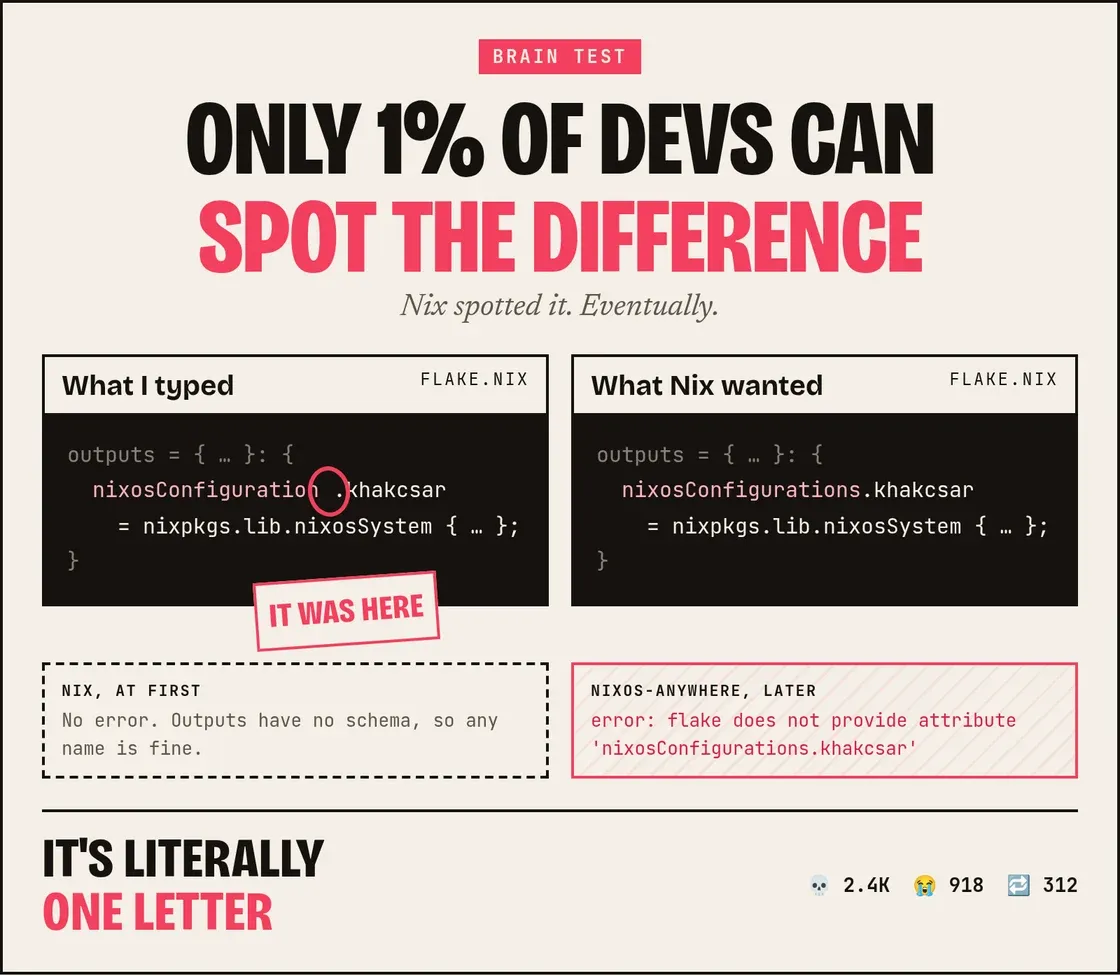 Roses are red. I hate typos. Poetry's hard. NixOS
disko.nix
{
  disko.devices.disk.main = {
    type = "disk";
    device = "/dev/sda";
    content = {
      type = "gpt";
      partitions = {
        ESP = {
          size = "512M";
          type = "EF00";
          content = {
            type = "filesystem";
            format = "vfat";
            mountpoint = "/boot";
            mountOptions = [ "umask=0077" ];
          };
        };
        root = {
          size = "100%";
          content = { type = "filesystem"; format = "ext4"; mountpoint = "/"; };
        };
      };
    };
  };
}
The 512 MB ESP matters. A generation can be considered a version of your system, and you can roll back to a previous one if needed. systemd-boot keeps a kernel and initrd per generation in the ESP (about 50 to 60 MB each on ARM), and generations that use the same kernel share one copy. Ubuntu's 99 MB EFI partition would fill up fast. There's no swap partition. zram handles that.
default.nix
{ modulesPath, pkgs, ... }:

let
  sshKey = "ssh-ed25519 AAAA... you@laptop";
in
{
  imports = [
    (modulesPath + "/profiles/qemu-guest.nix")   # virtio drivers: without this, no /dev/sda at boot
    ./disko.nix
    ./hardware-configuration.nix
    ../../services/caddy.nix
  ];

  # Boot
  boot.loader.systemd-boot.enable = true;
  boot.loader.systemd-boot.configurationLimit = 10;     # protects the 512M ESP
  boot.loader.efi.canTouchEfiVariables = true;
  boot.kernelParams = [ "console=ttyAMA0" "console=tty1" ];  # ttyAMA0 = the ARM serial port OCI's console reads

  # Network
  networking.hostName = "khakcsar";
  networking.useDHCP = true;
  networking.firewall = {
    enable = true;
    allowedTCPPorts = [ 22 80 443 ];
  };
  time.timeZone = "UTC";

  # SSH: keys only, no root
  services.openssh = {
    enable = true;
    settings = {
      PasswordAuthentication = false;
      KbdInteractiveAuthentication = false;
      PermitRootLogin = "no";
    };
  };

  # Users: fully declarative
  users.users.khakcsar = {
    isNormalUser = true;
    extraGroups = [ "wheel" ];
    hashedPasswordFile = "/var/lib/secrets/khakcsar-password-hash";   # serial console only (see below)
    openssh.authorizedKeys.keys = [ sshKey ];
  };
  users.mutableUsers = false;
  security.sudo.wheelNeedsPassword = false;

  # Nix itself
  nix.settings = {
    experimental-features = [ "nix-command" "flakes" ];
    trusted-users = [ "@wheel" ];
  };
  nix.gc = { automatic = true; dates = "weekly"; options = "--delete-older-than 14d"; };
  nix.optimise.automatic = true;

  zramSwap.enable = true;

  environment.systemPackages = with pkgs; [ git vim htop btop curl tree ncdu ];

  system.stateVersion = "26.05";   # the release you FIRST installed. Never change it.
}
The lines specific to OCI are qemu-guest.nix (virtio disk and network drivers) and console=ttyAMA0. Without the second one the serial console you tested earlier stays blank on NixOS.
For the very first install, hashedPasswordFile doesn't exist yet because the server hasn't been installed. So for the first install I put the hash straight into the config with hashedPassword, and moved it out later.
Generating the hash. On the laptop, run:
nix shell nixpkgs#mkpasswd -c mkpasswd -m yescrypt
It asks for the password twice and prints something like $y$j9T$.... That's a hash, not the password: it can check a password but can't be turned back into one. yescrypt is what modern Linux uses for /etc/shadow and it's deliberately slow to crack.
Then paste the output into the config:
hashedPassword = "$y$j9T$..."; # first install only, see "Sharing the config"
The $ signs are fine inside a Nix string. Nix only treats ${ as special and the hash never contains it.
Test it before you need it. After the install, log in on the serial console with this password once. That's the whole point of it. The moment SSH breaks, this is the only way in.
Even a hash shouldn't be public. Anyone who has it can try guessing passwords offline for as long as they like. That's why I moved it into hashedPasswordFile outside the repo. More on that in the section about sharing the config.
Check before touching the server
echo "{ }" > hosts/khakcsar/hardware-configuration.nix   # placeholder; an empty *file* is a syntax error
git add -A
nix eval .#nixosConfigurations.khakcsar.config.system.build.toplevel.drvPath
nix eval merges every module and type-checks every option without building anything. So it works fine on an x86 laptop for an ARM target. It's great at catching typos. My user.users.khakcsar failed right away with "The option user does not exist."
Part 3: The install
nix run github:nix-community/nixos-anywhere -- \
  --flake .#khakcsar \
  --kexec https://github.com/nix-community/nixos-images/releases/download/nixos-26.05/nixos-kexec-installer-noninteractive-aarch64-linux.tar.gz \
  --generate-hardware-config nixos-generate-config ./hosts/khakcsar/hardware-configuration.nix \
  --build-on remote \
  -i ~/.ssh/<your-key> \
  ubuntu@<instance-ip>
nixos-anywhere SSH's into Ubuntu and uses kexec to swap the running kernel for a NixOS installer in RAM. It then partitions the disk with disko, builds the system, installs it, and reboots. With --build-on remote, the ARM server builds its own system so my x86 laptop never has to emulate ARM. Amazing right?
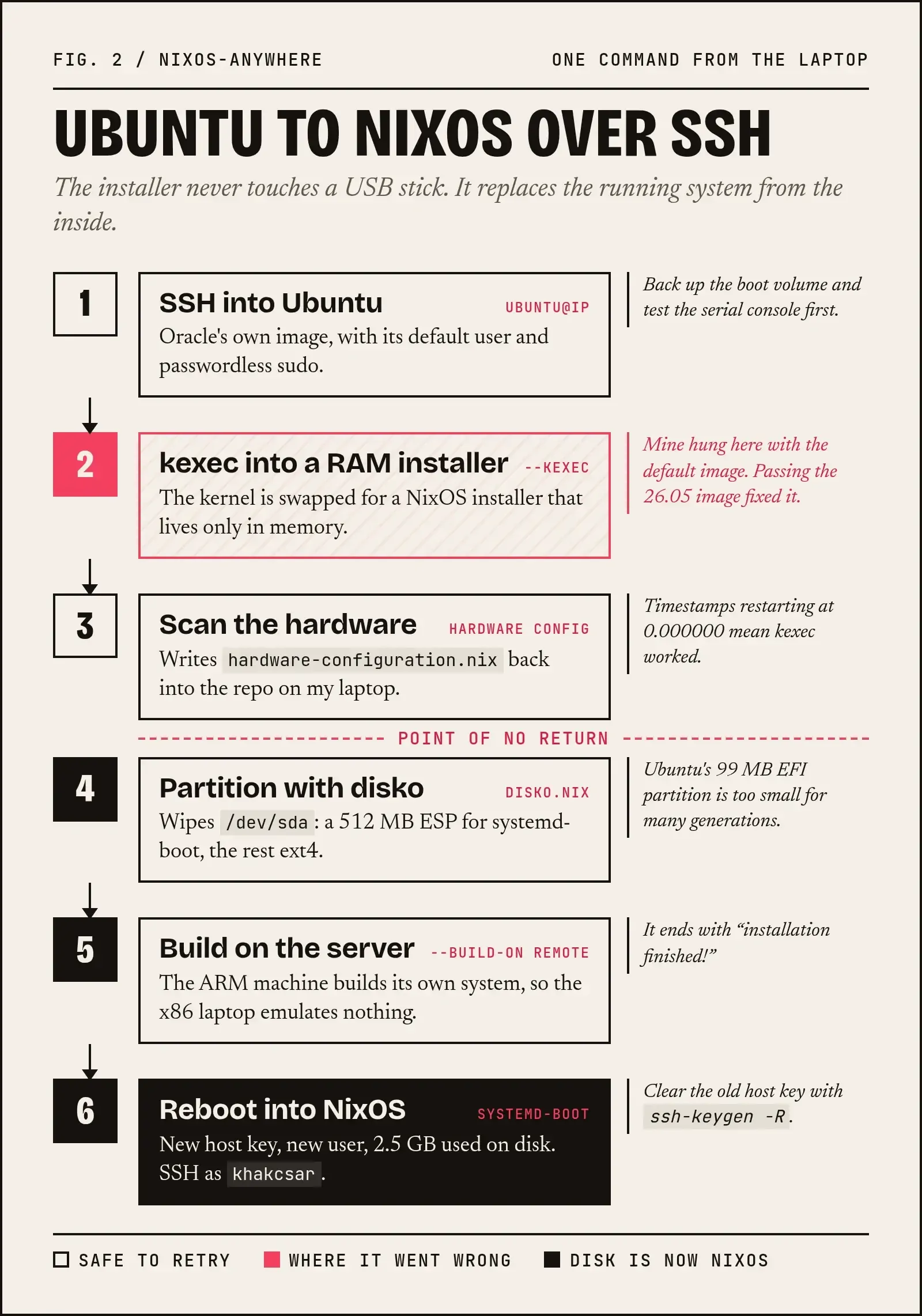
The --kexec flag: my first attempt hung
Without --kexec, nixos-anywhere used its default installer image (nixos-installer-kexec-25.11pre-git). It printed machine will boot into nixos in 6s..., reconnected a few times, and then:
ssh: connect to host <instance-ip> port 22: Connection timed out
 I lowkey thought my instance was history
The serial console showed Ubuntu (its root partition sda1, its machine-id), spamming errors:
I/O error, dev sda, sector 4016664 op 0x1:(WRITE)
Aborting journal on device sda1-8.
EXT4-fs (sda1): Remounting filesystem read-only
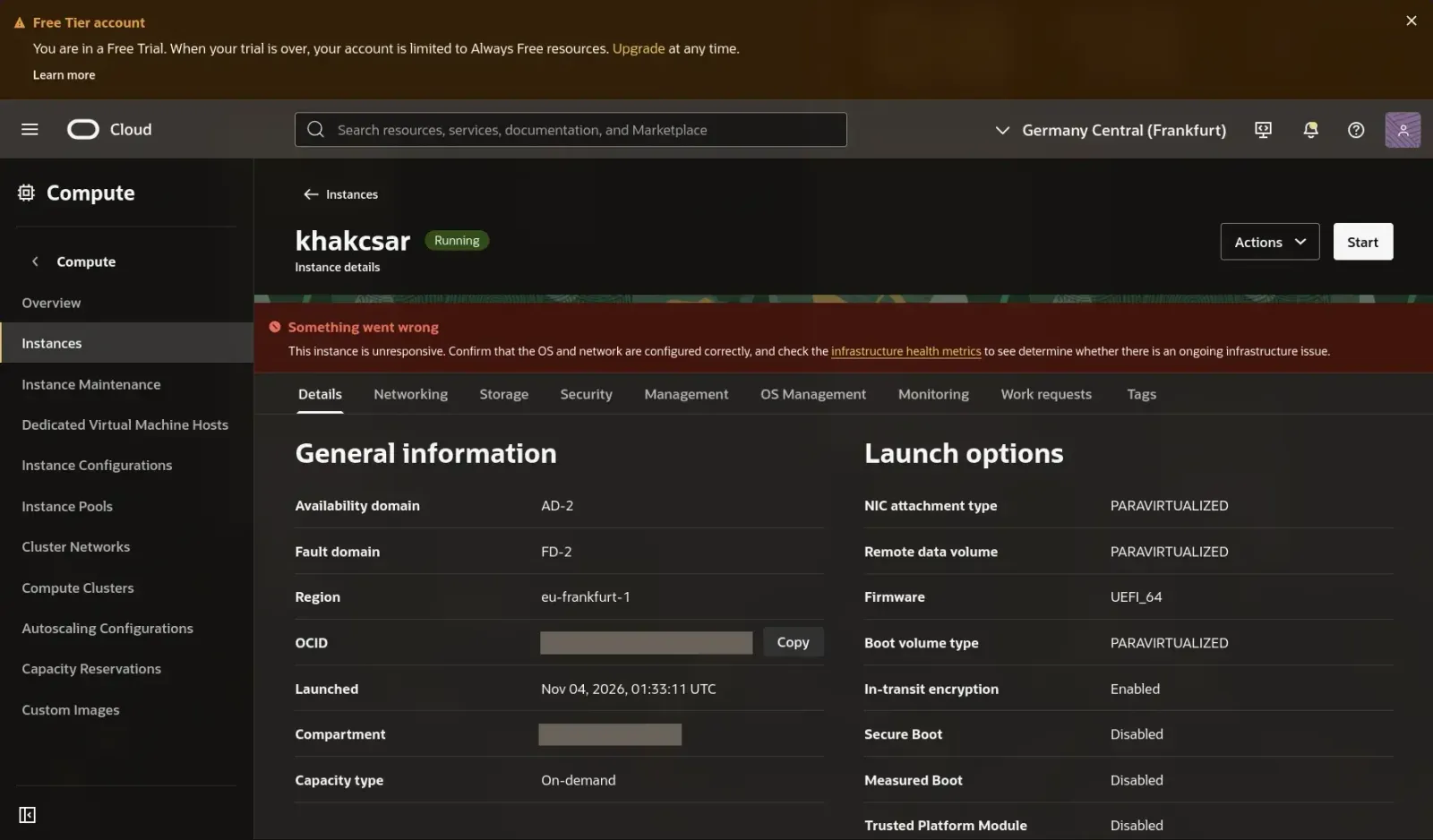
So kexec had loaded the new kernel and shut down Ubuntu's disk and network devices but the jump into the new kernel never happened. Ubuntu kept running with no disk and no network.
The good news: disko hadn't run yet so the disk was untouched. A force reboot (Actions → Reboot → Force) brought Ubuntu back and calmed my inner soul. Passing the 26.05 image explicitly with --kexec worked on the first try. Secure Boot was off, so that wasn't the cause.
Other people have installed on OCI with the default image without trouble, so this may depend on the instance or the kernel. If yours hanged on the same step, now you know what to do.
What a successful run looks like:
- After
machine will boot into nixos in 6s…, the console's kernel timestamps restart at[ 0.000000]. That means kexec worked. - The hardware config file gets generated, then disko wipes and partitions the disk (the point of no return), then the build and install run.
installation finished!, then### Done! ###
I landed in the UEFI boot menu at first, because I'd pressed a key in the console. Linux Boot Manager is systemd-boot.
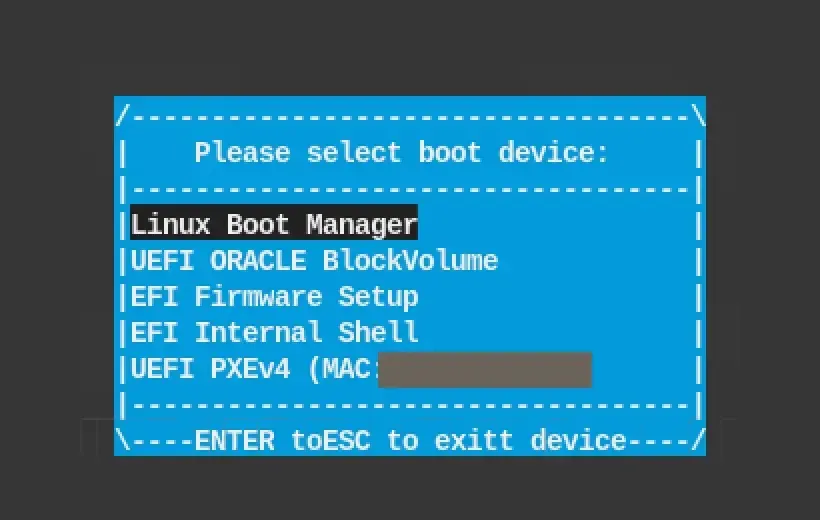
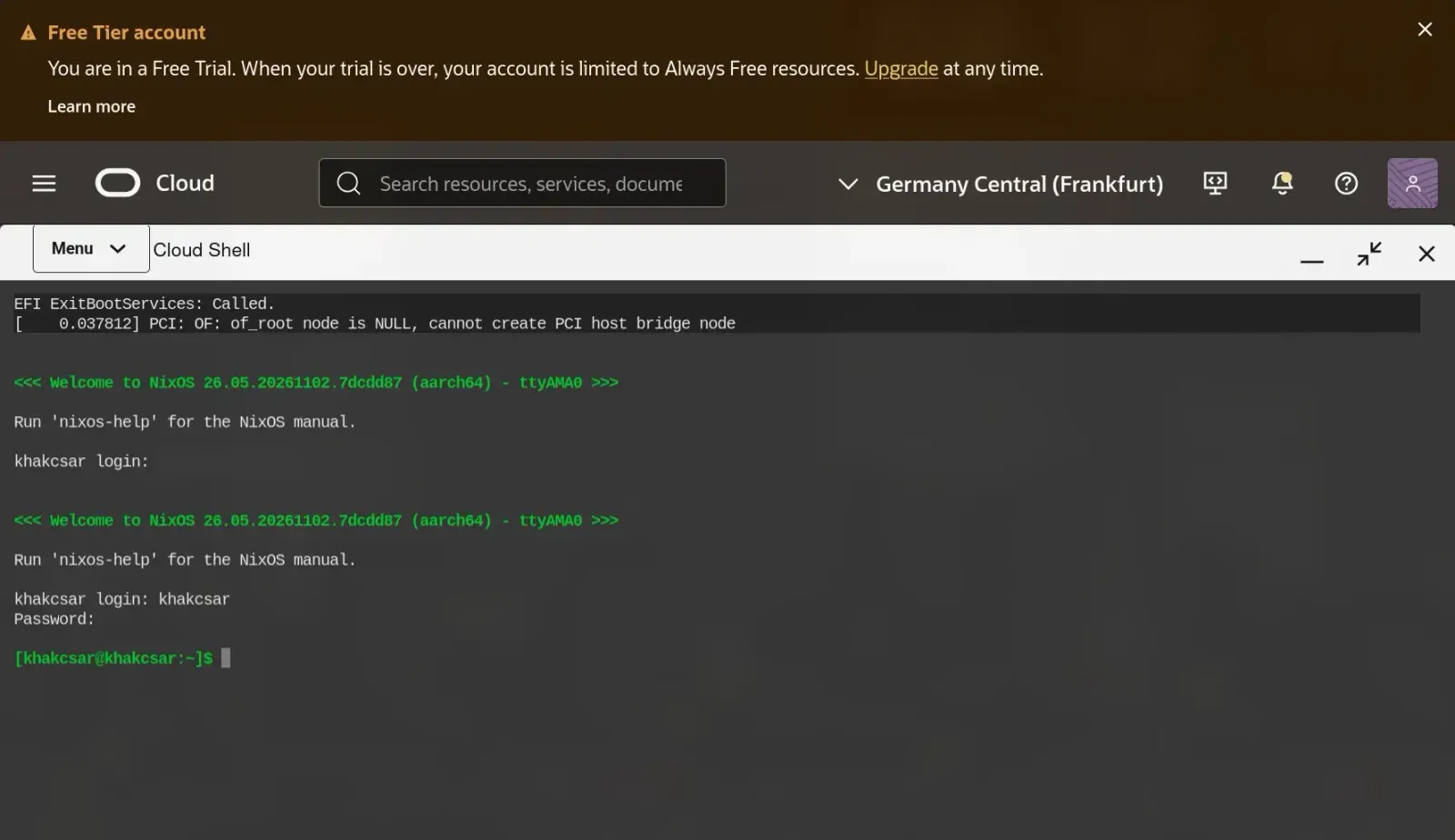
Careful: type the username at
login:. I typed my password there and it showed up in plain text 💀. That's why I don't have an unedited screenshot of that moment.
After the install
The server now has a new SSH host key so the laptop refuses to connect (REMOTE HOST IDENTIFICATION HAS CHANGED). Remove the old Ubuntu entry, then log in as the new user:
ssh-keygen -R <instance-ip>
# ~/.ssh/config: User ubuntu → User khakcsar
ssh khakcsar
That's the server's key not yours. Your own key pair is untouched. If you want to be thorough, compare the fingerprint SSH shows you with ssh-keygen -lf /etc/ssh/ssh_host_ed25519_key.pub, run over the serial console.
[khakcsar@khakcsar:~]$ nixos-version
26.05.20261102.7dcdd87 (Yarara)
[khakcsar@khakcsar:~]$ systemctl --failed
0 loaded units listed.
[khakcsar@khakcsar:~]$ df -h / /boot
/dev/sda2        46G  2.5G   41G   6% /
/dev/sda1       511M   87M  425M  17% /boot
A whole OS in 2.5 GB.
Part 4: Deploying changes from the laptop
nix run --inputs-from . nixpkgs#nixos-rebuild -- switch \
  --flake .#khakcsar --target-host khakcsar --build-host khakcsar --sudo
| Part | Why |
|---|---|
--inputs-from . nixpkgs#nixos-rebuild | Uses the nixos-rebuild from my locked nixpkgs. Nothing installed on Arch |
--target-host | Where to activate. Without it, the laptop is the target. Missing it is dangerous |
--build-host | Build natively on the ARM server |
--sudo | Activate with sudo on the server |
You may see warning: could not re-exec in a newer version of nixos-rebuild. nixos-rebuild tries to restart as the copy inside the target config, which is an ARM binary the x86 laptop can't run. It's harmless; --no-reexec silences it.
The first deploy surprised me: I added a package tree to systemPackages, deployed, and it was available in my already open SSH session. PATH includes /run/current-system/sw/bin, and activation just flips the /run/current-system symlink in one step. Only services whose config changed get restarted. sshd hadn't changed, so my session survived.
Rollback
nix run --inputs-from . nixpkgs#nixos-rebuild -- switch --rollback --flake .#khakcsar --target-host khakcsar --sudo
A rollback builds nothing: the previous generation is already on the server. tree vanished, and deploying again brought it back.
Fun fact: deploying an identical config doesn't create a new generation. The new system has the same store path as the newest generation, so Nix just reuses it.
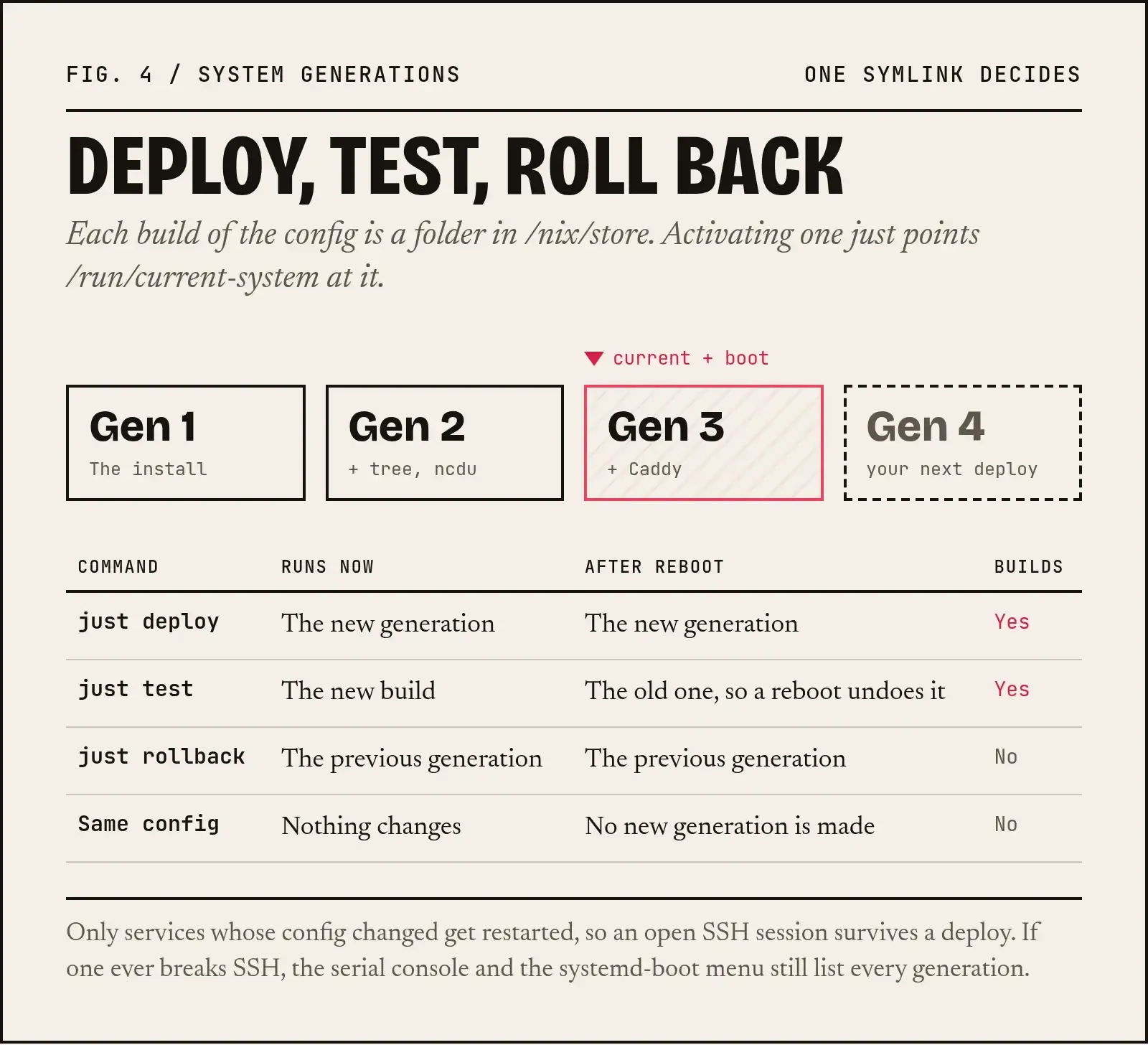
My safety nets:
- Bad deploy, but SSH still works:
switch --rollback. - Bad deploy that broke SSH or the network: serial console, reboot, and pick an older generation in the systemd-boot menu.
- A risky firewall, SSH or network change: deploy with
testinstead ofswitch. It activates without becoming the boot default, so a reboot undoes it.
A justfile so I never forget --target-host
just is a small command runner. You write named recipes in a file called justfile, and just deploy runs the matching one. Think of it as a Makefile without the build-system baggage.
Installing it on the laptop. Pick one:
# With Nix, like everything else here (on older Nix the command is "nix profile install")
nix profile add nixpkgs#just

# Or with Arch's package manager
sudo pacman -S just

# Or without installing anything, once
nix run nixpkgs#just -- deploy
I installed it through pacman because Arch (btw)
If your shell says just: command not found after the Nix install, ~/.nix-profile/bin isn't on your PATH yet. Open a new terminal, or add it to your shell's config.
Using it. Save the file below as justfile in the root of the config repo, next to flake.nix. Then just --list shows every recipe with its comment, and just deploy runs one. Recipe lines must be indented, the same way in the whole file.
host := "khakcsar"
rebuild := "nix run --inputs-from . nixpkgs#nixos-rebuild -- --no-reexec"

# Build on the server and switch to it (+ make it the boot default)
deploy:
    {{ rebuild }} switch --flake .#{{ host }} --target-host {{ host }} --build-host {{ host }} --sudo

# Activate without making it the boot default: a reboot undoes it
test:
    {{ rebuild }} test --flake .#{{ host }} --target-host {{ host }} --build-host {{ host }} --sudo

# Back to the previous generation (nothing is built)
rollback:
    {{ rebuild }} switch --rollback --flake .#{{ host }} --target-host {{ host }} --sudo

# Evaluate the whole config locally (catches typos, builds nothing)
check:
    nix eval .#nixosConfigurations.{{ host }}.config.system.build.toplevel.drvPath

# List system generations on the server
generations:
    ssh {{ host }} sudo nix-env --list-generations -p /nix/var/nix/profiles/system

# Update flake.lock
update:
    nix flake update
My workflow is now: edit, just check, just deploy, git commit.
Part 5: Caddy, HTTPS and a free domain
Two firewalls guard every port: OCI's Security List and networking.firewall. When something doesn't respond, curl tells you which layer to look at:
curl says | Meaning |
|---|---|
| Times out | Blocked, usually by the OCI Security List |
Connection refused | Got through, but nothing is listening |
| Certificate error | Reached Caddy, but no certificate yet: check journalctl -u caddy |
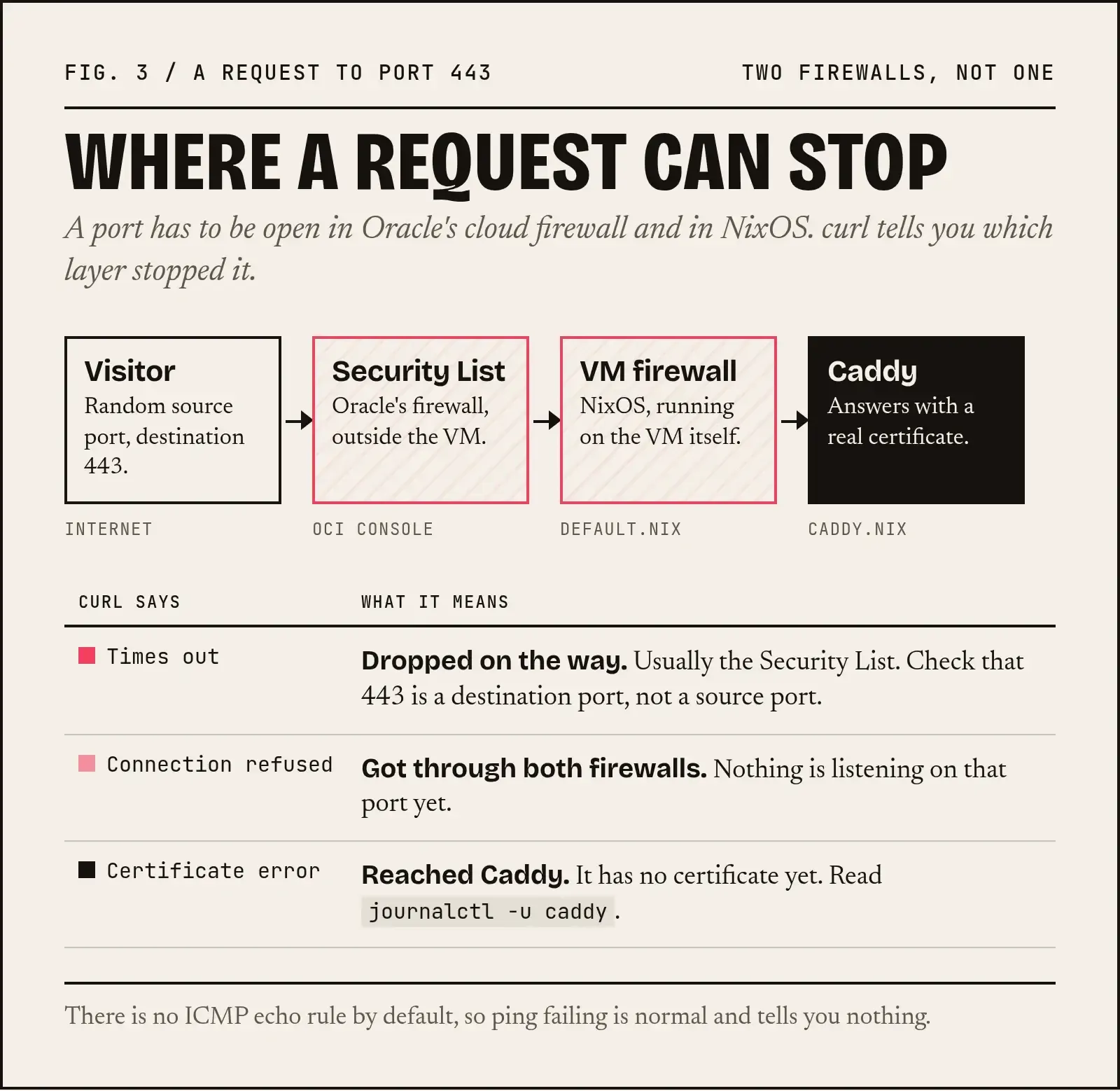
I didn't own a domain for testing, so I used sslip.io: 203-0-113-10.sslip.io resolves to 203.0.113.10, so you put your own IP in place of that one. Let's Encrypt issues real certificates for those names.
services/caddy.nix:
{ pkgs, ... }:

let
  domain = "203-0-113-10.sslip.io";   # your IP with dashes

  # The website is built as a package in the Nix store
  site = pkgs.writeTextDir "index.html" ''
    <!doctype html>
    <html>
      <head><meta charset="utf-8"><title>khakcsar</title></head>
      <body><h1>Hello from NixOS on Oracle Cloud 🗿</h1></body>
    </html>
  '';
in
{
  services.caddy = {
    enable = true;
    virtualHosts.${domain}.extraConfig = ''
      root * ${site}
      file_server
    '';
  };
}
pkgs.writeTextDir puts the page in /nix/store/HASH-index.html/. Change the HTML and you get a new store path; roll back and the old page comes back. The website is part of the system generation. Caddy gets a Let's Encrypt certificate, redirects HTTP to HTTPS and renews automatically, with zero TLS config.
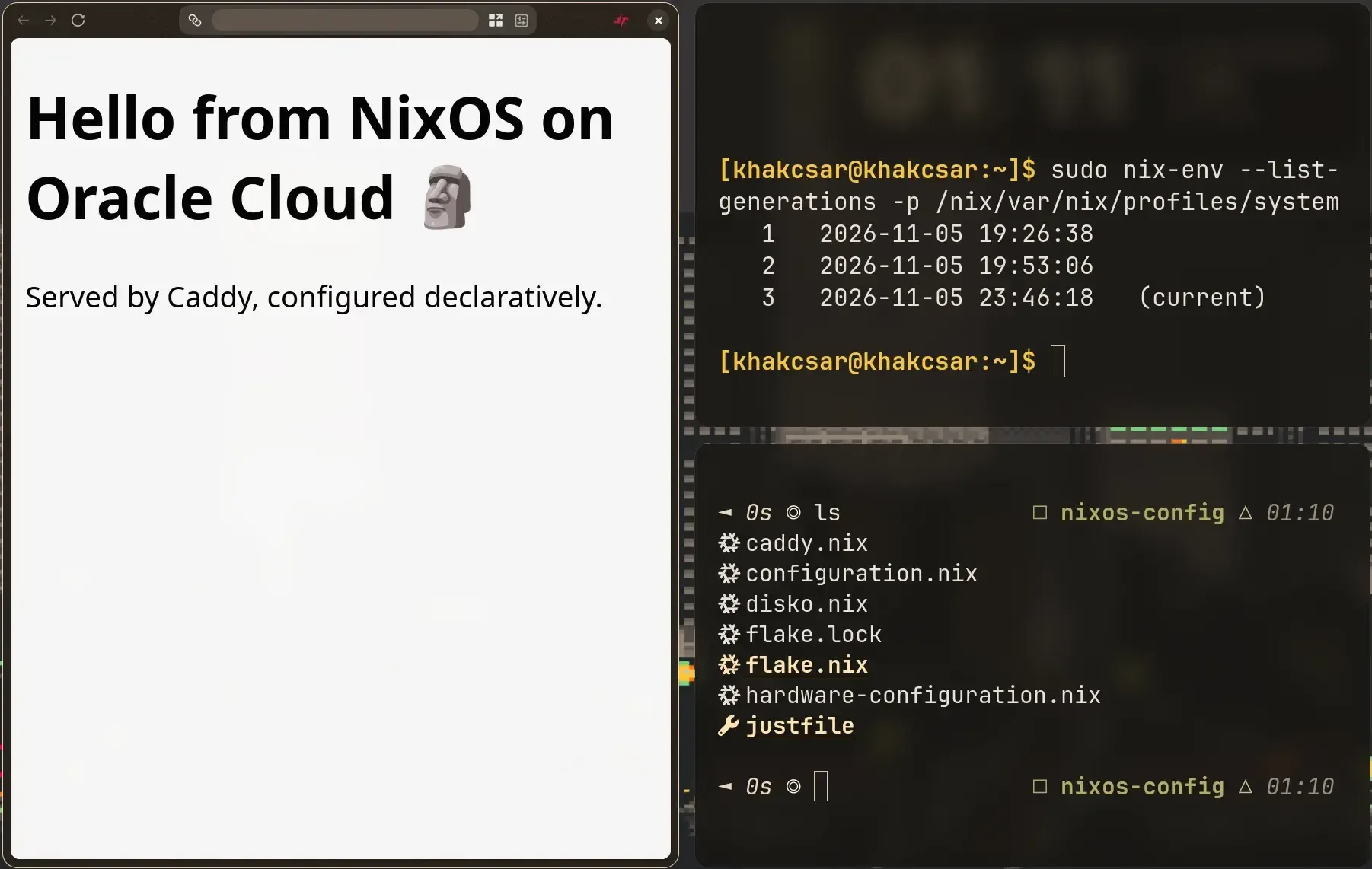 NixOS serving a static page from my instance 🗿
Bug: my first
caddy.nixstarted with{ pkgs, ... };. It needs a colon, because a module is a function. These typos will be the end of me.
Part 6: Sharing the config, but not everything
Someone on Reddit asked for my config, so I wanted it public. Two problems.
1. The password hash was in every commit
A yescrypt hash is safe to store but public means anyone can try to crack it offline. First I moved it into a file only root can read on the server. You can copy it straight out of /etc/shadow:
sudo sh -c 'umask 077; mkdir -p /var/lib/secrets && getent shadow khakcsar | cut -d: -f2 > /var/lib/secrets/khakcsar-password-hash'
Then hashedPassword = "…"; became hashedPasswordFile = "/var/lib/secrets/khakcsar-password-hash";. Create the file before deploying, or the console password disappears.
Then I scrubbed it from history. I wanted to keep my commits, not squash everything into one, so I used git-filter-repo:
cp -r nixos-config nixos-config-backup                 # backup first (it still contains the hash; never push it)
printf '%s\n' 'regex:\$y\$[^"]*==>REMOVED' > ~/filter-rules.txt
cd nixos-config
nix shell nixpkgs#git-filter-repo -c git filter-repo --replace-text ~/filter-rules.txt --force
git log --all -p | grep -c 'y\$j9T'                    # 0
git cat-file --batch-all-objects --batch | grep -ca 'y\$j9T'   # 0, including unreachable objects
Old commits now say hashedPassword = "REMOVED";. Every commit ID changes, so do this before the first push.
2. I didn't want to publish which apps I run
The solution: two flakes.
- Public
nixos-config: the base system, exported asnixosModules.khakcsar(seeflake.nixabove). - Private
nixos-infra: imports the public flake and adds my apps. Thejustfilelives here, and this is the only repo I deploy from. (Again, I'm no expert so I'm not aware of the standard way to create this config so if you know a better way to handle this usecase then let me know via email or my socials)
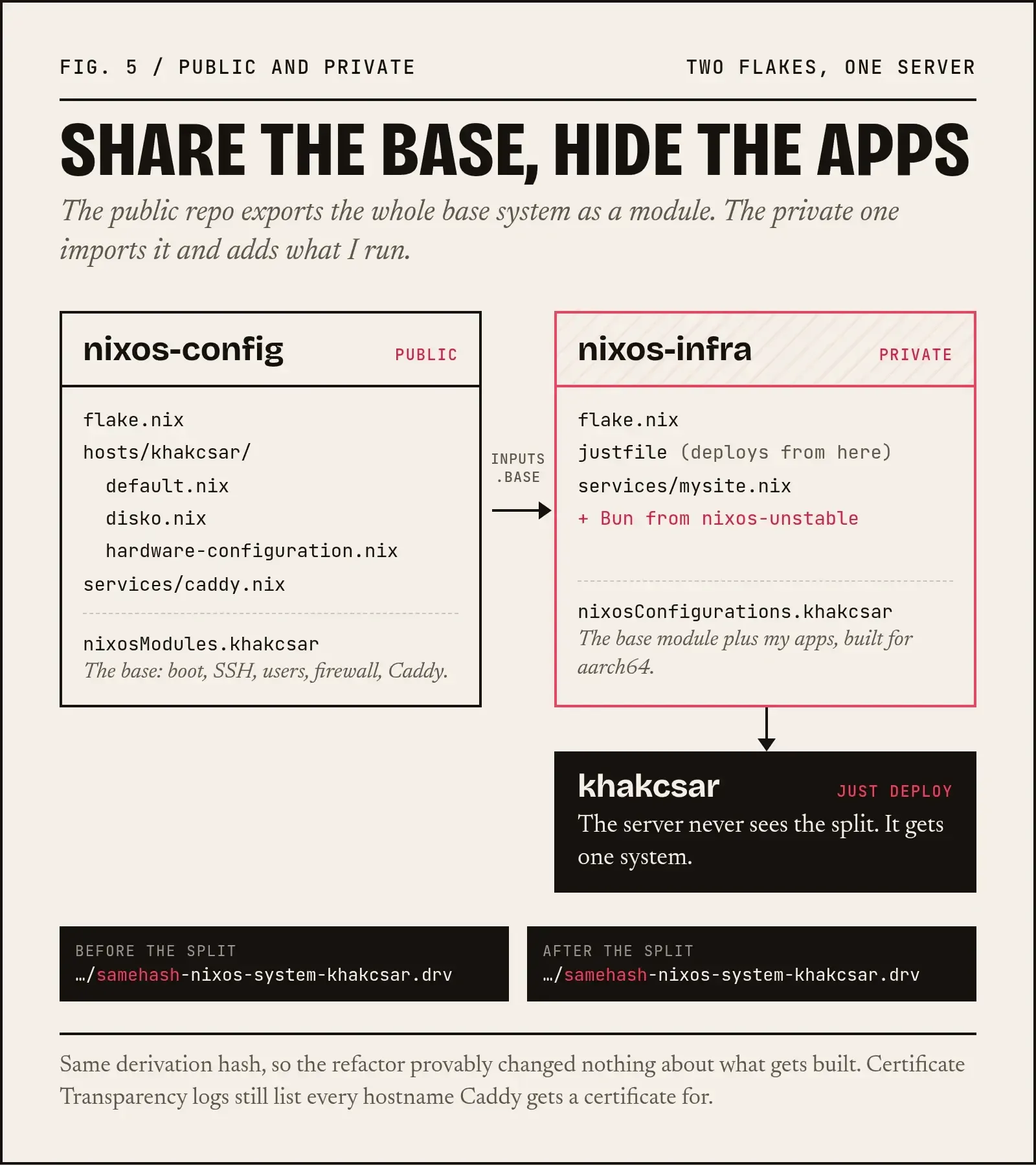
# nixos-infra/flake.nix (private)
{
  inputs = {
    base.url = "github:designbyfaizi/nixos-config";
    nixpkgs.follows = "base/nixpkgs";               # one nixpkgs, owned by the base
    nixpkgs-unstable.url = "github:NixOS/nixpkgs/nixos-unstable";
  };

  outputs = { self, nixpkgs, nixpkgs-unstable, base, ... }: {
    nixosConfigurations.khakcsar = nixpkgs.lib.nixosSystem {
      system = "aarch64-linux";
      specialArgs = {
        pkgs-unstable = nixpkgs-unstable.legacyPackages.aarch64-linux;
      };
      modules = [
        base.nixosModules.khakcsar
        ./services/mysite.nix
      ];
    };
  };
}
Changing the base means pushing the public repo, then running nix flake update base in the private one, then deploying.
My favourite trick from this whole project: after each refactor, I ran just check and confirmed the .drv hash was identical. Moving files or splitting flakes doesn't change what gets built, so a matching hash proves the refactor changed nothing, giving me an inner peace moment.
One more thing: if you're hiding hostnames for privacy, don't count on it. Every Let's Encrypt certificate is published in Certificate Transparency logs (crt.sh). The private repo hides how things run, not that they exist.
Part 7: A Nuxt and Bun app without Docker
The app is a Nuxt 4 site: Nitro with preset: "bun", Nuxt Content (SQLite), @nuxt/image (sharp), shadcn-vue, and Sveltia CMS, which commits content edits straight to GitHub. Pages are prerendered, but a server still has to run for the API route and for resizing images on demand.
On Dokploy, it was a Dockerfile plus a webhook. Here's the NixOS version.
DNS: a wildcard for test apps
My primary domain was connected to my main vps, so I decided to create .nix subdomains for this server. In Cloudflare (DNS only, grey cloud):
| Name | Type | Content |
|---|---|---|
nix | A | <instance-ip> |
*.nix | A | <instance-ip> |
Now anything.nix.example.com reaches the server. I originally wanted *-nix.example.com, but a DNS wildcard has to be a whole label, so *.nix is the closest you can get. Caddy still gets one normal certificate per hostname you configure. You don't need a wildcard certificate.
Gotcha 1: the Bun version
bun install --frozen-lockfile with the Bun in nixos-26.05 (1.3.13):
warn: Ignoring lockfile
error: lockfile had changes, but lockfile is frozen
My bun.lock is in v2 format, which Bun 1.4 writes. nixos-unstable has 1.4.4, so the system stays on stable and I take just Bun from unstable. That's the pkgs-unstable in the private flake above.
Gotcha 2: prebuilt native modules
sharp and Tailwind's oxide ship prebuilt .node binaries:
$ readelf -d node_modules/@img/sharp-linux-x64/lib/*.node | grep NEEDED
 (NEEDED)  Shared library: [libvips-cpp.so.8.18.7]
 (NEEDED)  Shared library: [libstdc++.so.6]
 (NEEDED)  Shared library: [libgcc_s.so.1]
 ...
NixOS doesn't keep libstdc++ in /usr/lib, so I point them at Nix's copy with LD_LIBRARY_PATH = lib.makeLibraryPath [ pkgs.stdenv.cc.cc.lib ]. It's not elegant, but it works. More on that at the end.
The module: services/mysite.nix
{ pkgs, pkgs-unstable, lib, ... }:

let
  domain = "mysite.nix.example.com";
  repo = "git@github.com:you/mysite.git";
  stateDir = "/var/lib/mysite";
  port = 3000;

  bun = pkgs-unstable.bun;                                    # bun.lock v2 needs Bun 1.4
  libPath = lib.makeLibraryPath [ pkgs.stdenv.cc.cc.lib ];    # libstdc++ / libgcc_s for sharp & oxide

  # Fetch the latest commit, build it into its own release folder, switch to it
  deployScript = pkgs.writeShellApplication {
    name = "mysite-deploy";
    runtimeInputs = [ bun pkgs.git pkgs.openssh pkgs.coreutils pkgs.findutils ];
    text = ''
      cd ${stateDir}
      if [ ! -d repo ]; then
        git clone --branch main ${repo} repo
      fi
      cd repo
      git fetch origin main
      git reset --hard origin/main
      git clean -fdx -e node_modules

      rev=$(git rev-parse --short HEAD)
      release=${stateDir}/releases/$rev

      if [ -d "$release" ]; then
        echo "Release $rev is already built"
      else
        bun install --frozen-lockfile
        bun run build
        mkdir -p "$release"
        cp -r .output "$release/"
      fi

      ln -sfn "$release" ${stateDir}/current.new
      mv -T ${stateDir}/current.new ${stateDir}/current     # atomic switch

      # keep the 5 newest releases
      find ${stateDir}/releases -mindepth 1 -maxdepth 1 -type d -printf '%T@ %p\n' \
        | sort -rn | tail -n +6 | cut -d' ' -f2- | xargs -r rm -rf

      echo "Deployed $rev"
    '';
  };

  # The only thing the CI key may run: start the deploy, stream its log back
  ciTrigger = pkgs.writeShellApplication {
    name = "mysite-ci-trigger";
    runtimeInputs = [ pkgs.coreutils pkgs.systemd ];
    text = ''
      since=$(date '+%Y-%m-%d %H:%M:%S')
      status=0
      /run/wrappers/bin/sudo ${pkgs.systemd}/bin/systemctl start mysite-deploy || status=$?
      journalctl -u mysite-deploy --since "$since" --no-pager --output cat || true
      exit "$status"
    '';
  };

  ciKey = "ssh-ed25519 AAAA... github-actions deploy";
in
{
  users.users.mysite = {
    isSystemUser = true;
    group = "mysite";
    home = stateDir;
    createHome = true;
  };
  users.groups.mysite = { };

  # Verify github.com when cloning (background jobs can't answer the "yes/no" prompt)
  programs.ssh.knownHosts."github.com".publicKey =
    "ssh-ed25519 AAAAC3NzaC1lZDI1NTE5AAAAIOMqqnkVzrm0SdG6UOoqKLsabgH5C9okWi0dh2l9GKJl";

  # The site
  systemd.services.mysite = {
    description = "My Nuxt site (Bun)";
    wantedBy = [ "multi-user.target" ];
    after = [ "network.target" ];
    unitConfig.ConditionPathExists = "${stateDir}/current/.output/server/index.mjs";  # wait for the first build
    environment = {
      NODE_ENV = "production";
      HOST = "127.0.0.1";
      PORT = toString port;
      LD_LIBRARY_PATH = libPath;
    };
    serviceConfig = {
      User = "mysite";
      Group = "mysite";
      WorkingDirectory = "${stateDir}/current";
      ExecStart = "${lib.getExe bun} .output/server/index.mjs";
      Restart = "on-failure";
      RestartSec = 5;
      NoNewPrivileges = true;
      PrivateTmp = true;
      ProtectSystem = "strict";          # whole filesystem read-only…
      ProtectHome = true;
      ReadWritePaths = [ stateDir ];     # …except its own folder
    };
  };

  # The build/deploy job
  systemd.services.mysite-deploy = {
    description = "Build and deploy my site from GitHub";
    environment = {
      HOME = stateDir;
      GIT_SSH_COMMAND = "ssh -i ${stateDir}/.ssh/id_ed25519 -o IdentitiesOnly=yes";
      LD_LIBRARY_PATH = libPath;
    };
    serviceConfig = {
      Type = "oneshot";
      User = "mysite";
      Group = "mysite";
      ExecStart = lib.getExe deployScript;
      ExecStartPost = "+${pkgs.systemd}/bin/systemctl restart mysite.service";  # "+" = this line runs as root
      TimeoutStartSec = "30min";
    };
  };

  # The user GitHub Actions logs in as: one forced command, one sudo rule
  users.users.mysite-ci = {
    isSystemUser = true;
    group = "mysite-ci";
    shell = pkgs.bash;                      # sshd runs forced commands through the login shell
    extraGroups = [ "systemd-journal" ];    # to stream the deploy log back
    openssh.authorizedKeys.keys = [
      ''command="${lib.getExe ciTrigger}",restrict ${ciKey}''
    ];
  };
  users.groups.mysite-ci = { };

  security.sudo.extraRules = [{
    users = [ "mysite-ci" ];
    commands = [{
      command = "${pkgs.systemd}/bin/systemctl start mysite-deploy";
      options = [ "NOPASSWD" ];
    }];
  }];

  services.caddy.virtualHosts.${domain}.extraConfig = ''
    reverse_proxy 127.0.0.1:${toString port}
  '';
}
That services.caddy.virtualHosts block lands in the same Caddy as the public repo's caddy.nix; NixOS merges modules. writeShellApplication runs shellcheck at build time, so bash mistakes fail the deploy, not the site. (I had git rev-phase, --fdx and "$release"] in my first draft.)
How it maps to Docker:
| Dokploy / Docker | NixOS |
|---|---|
| Dockerfile build stage | deployScript |
| Container | mysite.service + systemd sandboxing |
| Traefik + domain | the Caddy virtualHosts block |
| Previous deployments | releases/<sha> + the current symlink |
Never put secrets in a
.nixfile. Everything Nix builds lands in/nix/store, readable by every user on the machine, and that includes unit files with theirenvironment. Use a file only root can read, or sops-nix.
A read-only deploy key
The repo is private. A deploy key belongs to one repo, not your account, and can be read-only:
sudo -u mysite mkdir -p -m 700 /var/lib/mysite/.ssh        # owned by the service user; SSH rejects loose permissions
sudo -u mysite ssh-keygen -t ed25519 -N "" -C "server deploy key" -f /var/lib/mysite/.ssh/id_ed25519
sudo cat /var/lib/mysite/.ssh/id_ed25519.pub                # → repo → Settings → Deploy keys (write access OFF)
sudo -u mysite ssh -i /var/lib/mysite/.ssh/id_ed25519 -o IdentitiesOnly=yes -T git@github.com
# Hi you/mysite! You've successfully authenticated...
First build: journalctl -u mysite-deploy -f in one terminal, sudo systemctl start mysite-deploy in another. A few minutes later:
● mysite.service - My Nuxt site (Bun)
     Active: active (running)
     Memory: 28.6M
bun[9952]: Listening on http://127.0.0.1:3000
About 29 MB of RAM for the running site. I checked an on-demand AVIF resize from outside, which proves sharp works on NixOS.
Deploy on push: GitHub Actions with a locked-down key
GitHub gets an SSH key to my server, so that key can do exactly one thing.
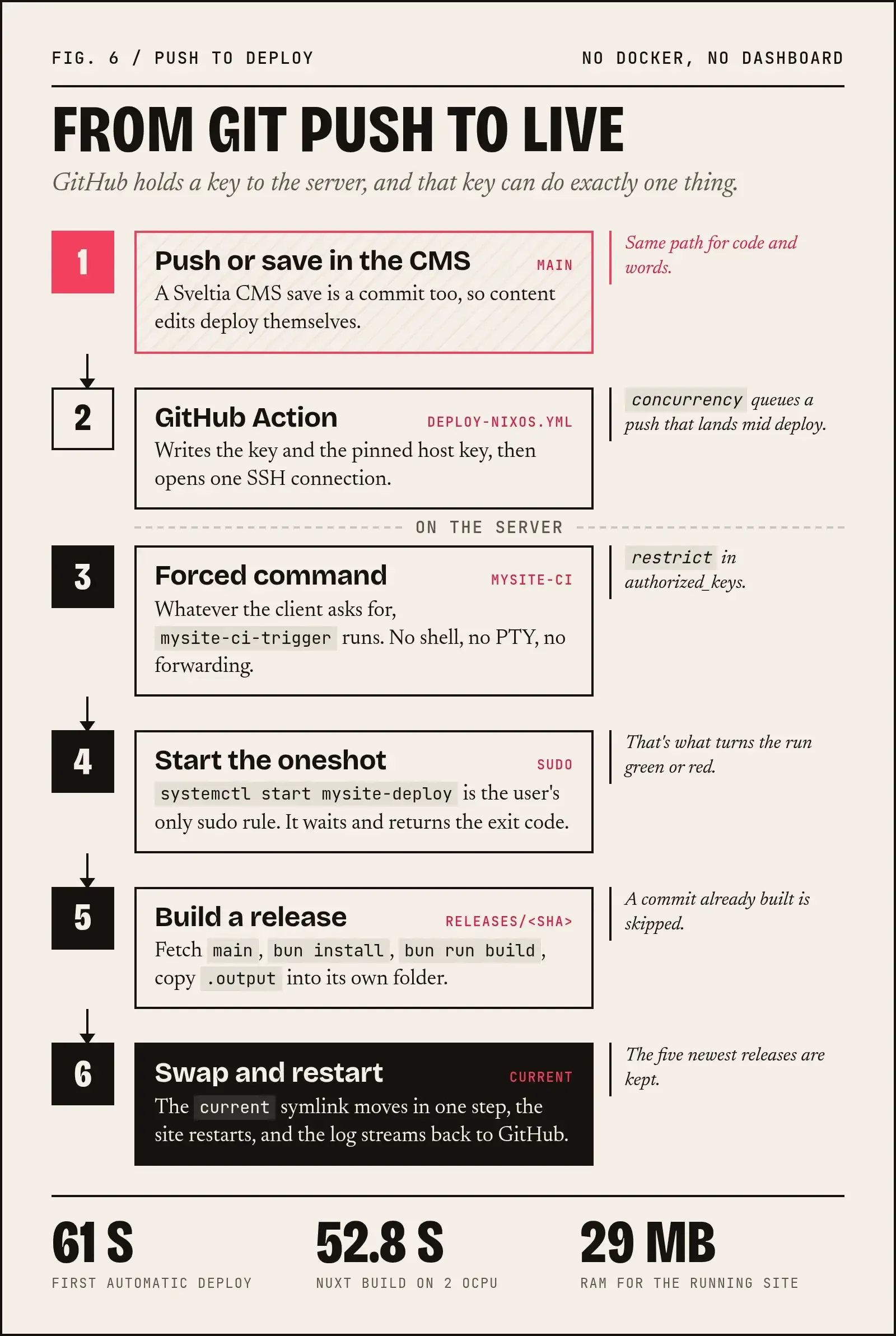
command="…"inauthorized_keys: every connection runs the trigger, whatever was asked.ssh … 'cat /etc/passwd'just deploys.restrict: no terminal and no forwarding. If you test it interactively, you'll seePTY allocation request failed, which means it's working.systemctl starton a oneshot waits for the job and returns its exit code, so GitHub shows a pass or a fail.
In the app repo, add two secrets: the CI private key, and the server's host key line (ssh-keyscan -t ed25519 <instance-ip>, after checking its fingerprint matches the one you saw on first login). Then .github/workflows/deploy-nixos.yml:
name: Deploy to NixOS

on:
  push:
    branches: [main]
  workflow_dispatch:          # "Run workflow" button = manual redeploy

# One deploy at a time: a push during a running deploy waits, then deploys the newest commit
concurrency:
  group: deploy-nixos
  cancel-in-progress: false

jobs:
  deploy:
    runs-on: ubuntu-latest
    timeout-minutes: 40
    steps:
      - name: Build and deploy on the server
        env:
          SSH_KEY: ${{ secrets.DEPLOY_SSH_KEY }}
          KNOWN_HOSTS: ${{ secrets.DEPLOY_KNOWN_HOSTS }}
        run: |
          install -d -m 700 ~/.ssh
          printf '%s\n' "$SSH_KEY" > ~/.ssh/deploy_key
          chmod 600 ~/.ssh/deploy_key
          printf '%s\n' "$KNOWN_HOSTS" > ~/.ssh/known_hosts
          ssh -T -i ~/.ssh/deploy_key -o IdentitiesOnly=yes -o ServerAliveInterval=30 mysite-ci@<instance-ip>
concurrency isn't optional here. systemctl start on a oneshot that's already running just joins it, so without it a push during a build would never get deployed.
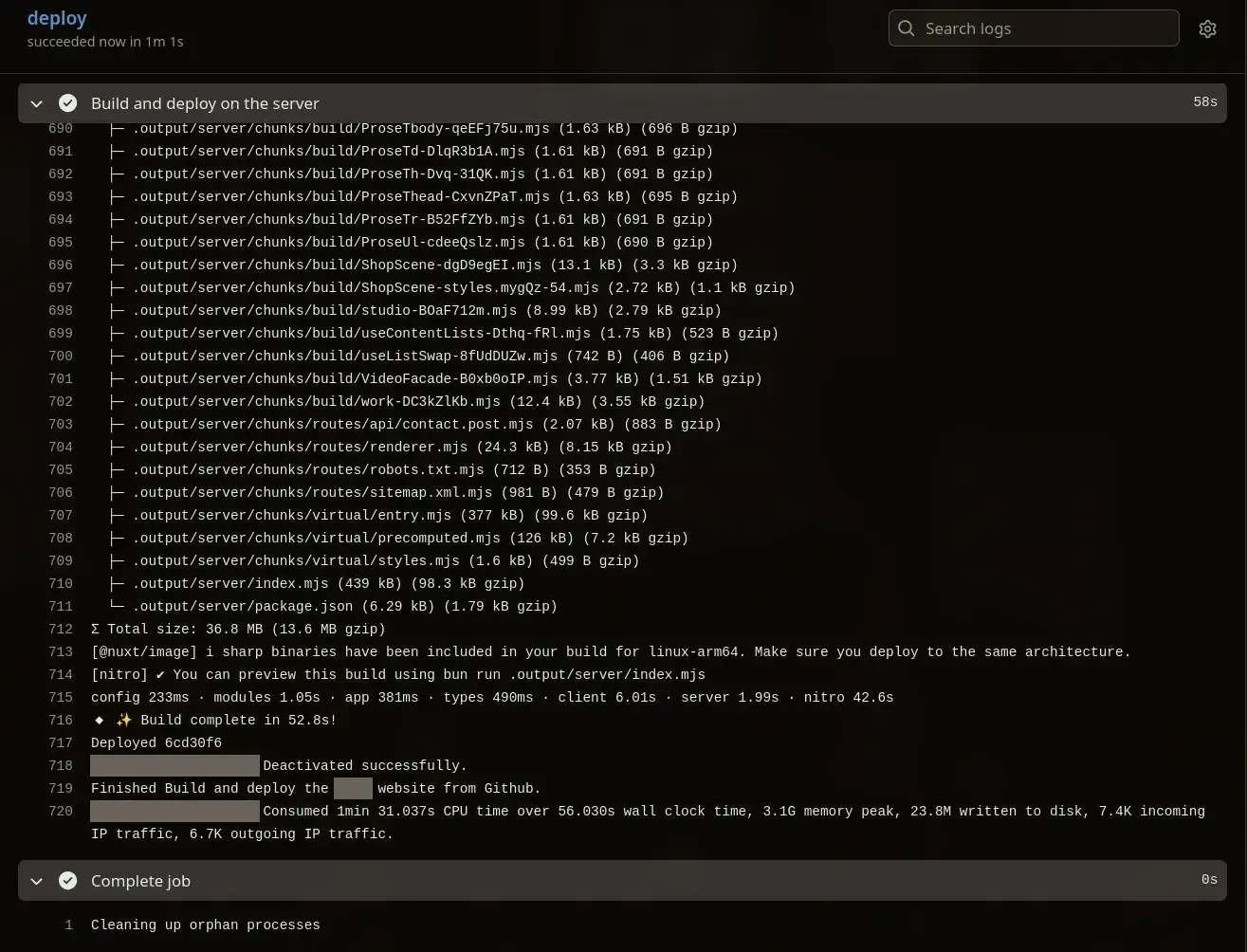
The first automatic deploy took 1 minute 1 second. The Nuxt build itself took 52.8 s on 2 OCPUs and peaked at 3.1 GB. On one of my old 4 GB Dokploy server, that same build got killed for running out of memory under Bun, and I had to build under Node with a 768 MB heap cap.
Sveltia CMS saves are just commits to main, so content edits deploy themselves. I tested it, and that was the moment Dokploy stopped being necessary for this site.
Part 8: Did I deploy it the Nix way?
Partly. Honestly, it's a hybrid: managed by NixOS, not built by Nix.
What is properly declarative and reproducible:
- The service, its user, the sandboxing, the reverse proxy and TLS
- The deploy job, the CI user, the forced-command key and the single sudo rule
- The exact Bun version pinned through
flake.lock - All of it is versioned in git and rolls back with system generations
What isn't:
- The app itself is built imperatively by
bun installandbun run buildat deploy time. Dependencies come from npm, pinned bybun.lockbut not by Nix hashes. The build needs network access, and its output lives in/var/lib, not in/nix/store. - Site versions aren't part of NixOS generations. Rolling back the system doesn't roll back the site (the
releases/folder handles that separately). - The
LD_LIBRARY_PATHworkaround keeps prebuilt binaries happy. The pure approach buildssharpagainst Nix'svipsinstead.
What the pure way would look like: package the site as a Nix derivation, with bun2nix turning bun.lock into fixed-output dependency fetches. The build output lands in /nix/store, and the service's ExecStart points into the store. Deploying a new version means nix flake update mysite && just deploy.
Why I didn't do that (yet): with a git-based CMS, every content edit would mean updating a lock file and rebuilding the whole system, and automating that across two repos means giving CI write access to my infra repo. Nuxt, Bun and sharp are also known to be fiddly to package purely. Because content changes much more often than infrastructure, splitting things this way made sense: NixOS owns the infrastructure, and the app ships its own releases.
The pure version is on my list as a learning project.
Part 9: My mistakes, collected
| Mistake | How it showed up |
|---|---|
nixosConfiguration (no s) | Nothing, until a tool looked for nixosConfigurations |
user.users | The option 'user' does not exist (caught by nix eval) |
{ pkgs, ... }; | Syntax error: modules need : |
User = "mysite", | unexpected ',': attributes end with ; |
github:NixIS/nixpkgs | Repository not found |
seld instead of self | called without required argument |
ciKey = ssh-ed25519 … (no quotes) | undefined variable 'ssh-ed25519' |
Forgot git add on a new file (happened numerous times) | Nix acts like the file doesn't exist |
Password typed at login: | Printed in plain text on the console |
nix-instantiate --parse x.nix /dev/null (missing >) | '/dev/null' is not a regular file, though the parse itself was fine |
As you can see, majority are typos. :)
The NixOS module system has a schema, so nix eval catches most of these before anything touches the server. Run it all the time.
Part 10: What's next
Some stuff that I plan to use and implement for learning purposes:
- sops-nix, for secrets that live encrypted in the repo
- restic backups
- PostgreSQL for the next app
- comin, if I ever have more than one server
- bun2nix, for the pure Nix version of the site
If you're thinking about trying NixOS on Oracle's free tier: do it. Test the serial console first, keep --kexec in your back pocket, and run nix eval before every deploy.
The config is at github.com/designbyfaizi/nixos-config.
 See you in the next one